Reference: Winlink Class A – Basic Winlink Operations, Room 219C
In preparation for Digital training at the State ARES Meeting on March 14, it is important to complete some activities ahead of the training day session. This will allow for the most instruction time and minimize any time needed to troubleshoot computers. Please complete all the activities below before training day.
- Bring your computer, fully charged. On-site charging may not be available in the class room.
- For all Windows PCs – Make sure all Windows Updates are applied.
- Download Winlink Express –
- Go to Winlink.org
- Click on Download
- Click on <dir> User Programs
- Click on Winlink_Express_install_1-7-30-0.zip
- “Save as” to folder of your choice. Folder can be put anywhere.
- Install
- Double-click to open the zip file and unzip it.
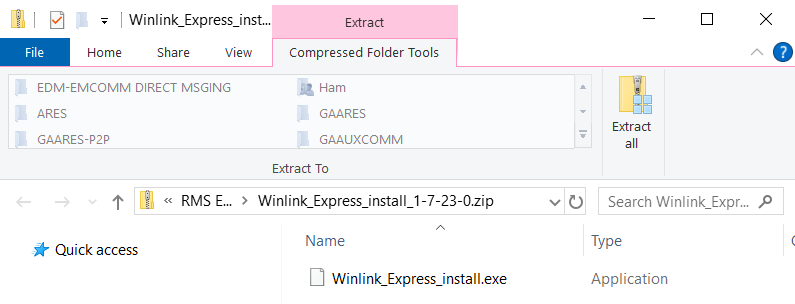
- In the newly opened window, click Extract all
- In new window, follow the prompts, click Extract (see next page)
- Installation
- Double-click on the file to start install
- Approve any Windows Protecting PC flags
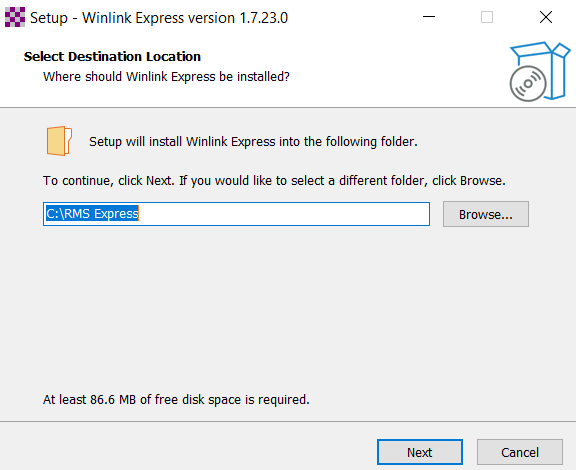
- Use the default, C:\RMS Express location, Click Next
- Installation: Final Steps
- Check the box Create a Desktop Shortcut
- Click Install
- DONE!
- Launch Winlink Express
We will pick up from this point and review many of the screens to finish the setup of Winlink Express.
- Determine your Home GPS Position – You can determine your latitude/longitude co-ordinates as follows.
- In your computer’s search engine enter “Maidenhead grid locator”
- Select Amateur Radio Ham Radio Maidenhead Grid Square Locator Map
- Enter your home QTH address – DO NOT enter your zip code
- Click Submit
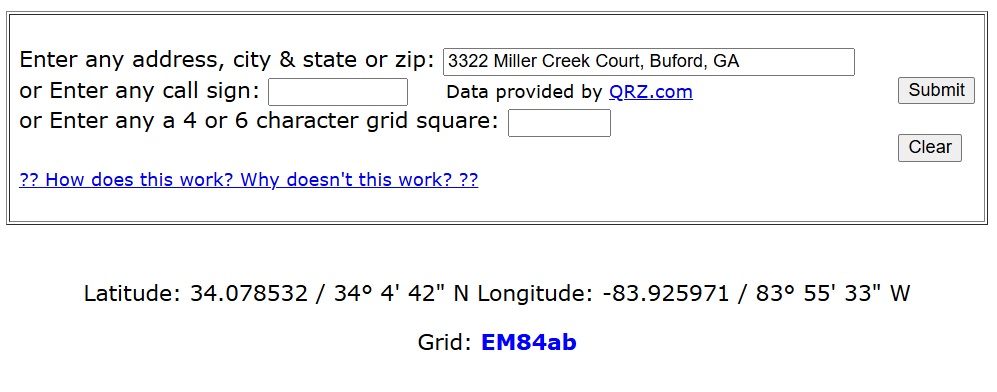
- For use at the forum, write down or print the Lat/Lon in decimal form and Grid.
Example: 34.078532, -83.925971, EM84ab
AT THE FORUM –
Forum times run 50 minutes. But setup time (problems), getting settled and questions cut this time down significantly. So, we may not be able to get through the entire presentation. This is true for all the day’s presentations. However, we have an edge. The assigned room (219C) is available for one hour after the officially scheduled time. This means that we can go over the scheduled time for an additional hour. If you do not have a forum scheduled for the 10:30 – 11:20 or 14:00 – 14:50 times, you are welcome to stay until you are happy with your setup and objectives are met.
See you at the state meeting on March 14.
Russell Prevost, AB4QQ